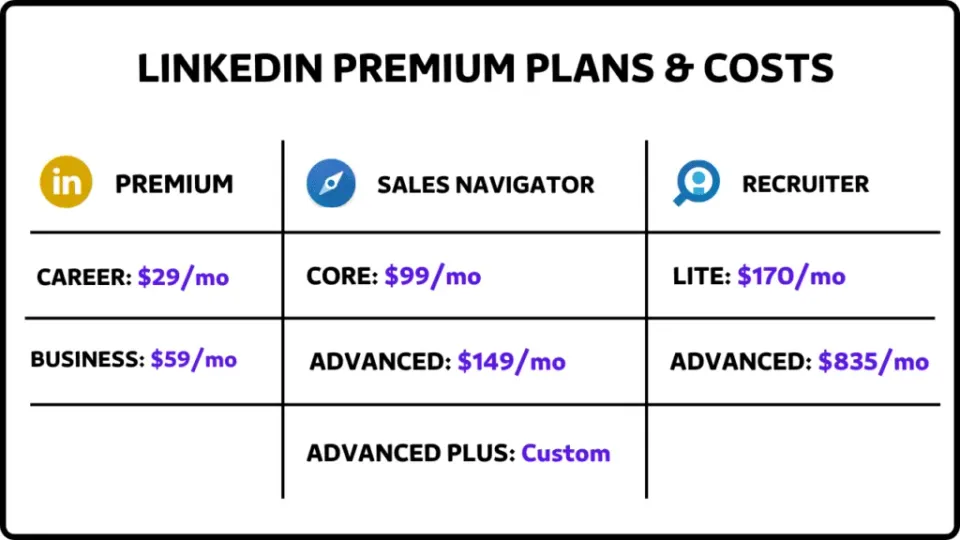
LinkedIn’s premium plans promise to supercharge your networking, job search, or sales efforts—but with so many options, it’s easy to overspend on features you don’t need. Let’s cut through the noise. After analyzing pricing, features, and real-world effectiveness, here’s the no-BS breakdown of which LinkedIn package is worth your money (and which ones to skip).
LinkedIn’s free tier isn’t just a placeholder—it’s a surprisingly robust platform that millions use to build professional networks. You can:
Free users hit walls fast—limitations that LinkedIn strategically places to encourage upgrades:
Who Should Stick to Free: Casual users, students, or anyone not actively job-hunting or selling. If you’re just networking or sharing industry insights, save your cash and focus on creating quality connections instead. Check out our Blog for more tips.
The Premium Career package targets job seekers with features designed to give you an edge in the application process:
While LinkedIn claims Premium Career users get hired 2x faster, the actual return on investment isn’t always clear:
Verdict: Only worth it if you’re actively job hunting in a competitive market where every advantage counts. Use the free trial strategically during your job search, but don’t hesitate to cancel if you’re not seeing results within 30 days.
Premium Business sits awkwardly between the Career and Sales Navigator packages:
Premium Business targets sales professionals but falls short in several critical areas:
Who It’s For: Solopreneurs or small teams needing light prospecting capabilities. Anyone serious about sales-focused networking should skip this tier and upgrade directly to Sales Navigator.
Sales Navigator comes in three increasingly powerful (and expensive) tiers:
| Plan | Monthly Cost | Key Features |
|---|---|---|
| Core | $99.99 | 50 InMails, advanced lead filters |
| Advanced | $149.99 | CRM integration, TeamLink connections |
| Advanced+ | Custom | Unlimited InMails, API access |
For sales professionals, Sales Navigator offers powerful tools that justify its premium price:
Despite its strengths, Sales Navigator isn’t perfect:
Who Needs It: Sales teams, founders, or anyone whose success depends on consistent outreach. For best results, pair it with tools like SalesRobot to automate personalized messaging and follow-ups. See the benefits of continuous feedback.
LinkedIn’s most expensive offerings target talent acquisition professionals:
For serious hiring operations, Recruiter provides substantial advantages:
The Recruiter packages come with significant drawbacks:
Best For: Recruitment agencies or enterprise companies filling 100+ roles yearly. For smaller teams, Recruiter Lite often isn’t worth it—Sales Navigator can handle 80% of your recruiting needs at nearly half the price.
LinkedIn’s educational platform offers professional development separate from other packages:
The Take: LinkedIn Learning provides convenient, professional-quality training, but it’s rarely essential. Find out more about employee engagement. Free alternatives from YouTube or audited courses from Coursera often cover similar material. Only subscribe if you prefer structured learning and your employer isn’t already providing training resources.
| Feature | Free | Premium Career | Premium Business | Sales Nav Core | Recruiter Lite |
|---|---|---|---|---|---|
| Monthly Cost | $0 | $29.99 | $59.99 | $99.99 | $170 |
| InMails | 0 | 5 | 15 | 50 | 30 |
| Profile View History | 5 viewers | 365 days | 365 days | 90 days | 90 days |
| Advanced Filters | Basic | Moderate | Moderate | Extensive | Extensive |
| Learning Courses | No | Yes | Yes | No | No |
| Best For | Networking | Job Seekers | Small Businesses | Sales Teams | Recruiters |
After reviewing all options, here’s what I recommend for different user types:
Several third-party solutions can enhance your LinkedIn experience without the premium price tag, including employee feedback tools:
LinkedIn’s paid plans can deliver genuine value — if you pick the right one for your specific needs. Skip the upsells, focus on tools that directly align with your goals, and remember: even the most expensive package won’t replace authentic relationship-building and valuable contributions to your professional community.
Can I cancel LinkedIn Premium at any time? Yes, LinkedIn Premium subscriptions are generally month-to-month (unless you paid annually), and you can cancel at any time. You will retain access until the end of your current billing cycle.
Is LinkedIn Premium worth it for students? Premium Career can be useful for students actively looking for internships or their first job, especially for the InMail credits and “Featured Applicant” status. However, students should first check if their university offers free or discounted access.
Does Sales Navigator include LinkedIn Learning? No, Sales Navigator plans typically do not include LinkedIn Learning. If you need both, you would need separate subscriptions or a bundle if available.
What happens to my data if I downgrade from Sales Navigator to Free? If you cancel Sales Navigator, you will lose access to the data specific to that platform, such as your saved lead lists, saved searches, and InMail history associated with Sales Navigator. It is recommended to export your data before cancelling.
Can I get a refund if I forget to cancel my free trial? LinkedIn’s refund policy is strict, and they generally do not offer refunds for subscriptions. It is crucial to set a reminder to cancel before your trial ends if you do not intend to continue.
Can I cancel LinkedIn Premium at any time? Yes, LinkedIn Premium subscriptions are generally month-to-month (unless you paid annually), and you can cancel at any time. You will retain access until the end of your current billing cycle.
Is LinkedIn Premium worth it for students? Premium Career can be useful for students actively looking for internships or their first job, especially for the InMail credits and “Featured Applicant” status. However, students should first check if their university offers free or discounted access.
Does Sales Navigator include LinkedIn Learning? No, Sales Navigator plans typically do not include LinkedIn Learning. If you need both, you would need separate subscriptions or a bundle if available.
What happens to my data if I downgrade from Sales Navigator to Free? If you cancel Sales Navigator, you will lose access to the data specific to that platform, such as your saved lead lists, saved searches, and InMail history associated with Sales Navigator. It is recommended to export your data before cancelling.
Can I get a refund if I forget to cancel my free trial? LinkedIn’s refund policy is strict, and they generally do not offer refunds for subscriptions. It is crucial to set a reminder to cancel before your trial ends if you do not intend to continue.